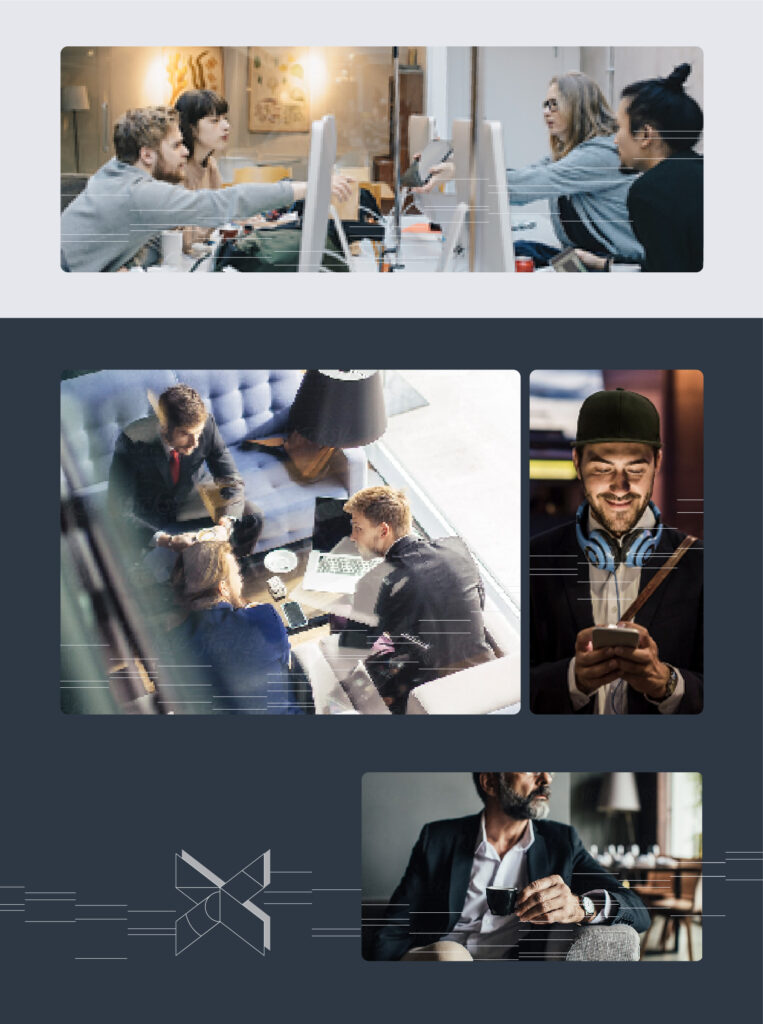
Our scenic images imbue a modern, energetic, and inspiring feel to our visual identity. Through images, we tell stories showcasing OIXIO’s role in positive breakthroughs in the developing world. These images are high-quality and expressive, representing the pursuit of the highest quality in our services and presenting our culture.
Diversity is key, with images showcasing people and businesses in our Baltic and Nordic markets. We suggest that inspiring images of people and interaction between them can be expressed by not only fully captured business meetings but by showing just one person, details of him/her, hand gestures, silhouettes, etc.
The themes depicted in the images should revolve around the processes of brainstorming and teamwork, or showcase their outcomes. Please refrain from directly illustrating the product or service in the images. Instead, focus on portraying individuals collaboratively engaged in the innovative process. Capture the essence of people working together towards a common goal, and highlight the joy and satisfaction derived from the achievements or results of their development efforts.
Important Note: Do not use these reference images in live productions as we do not own the rights to them. We are building our image bank to be our tool in the near future.
Using Storytelling Images
Use images in the frame with rounded corners. Amount of roundedness is 1/50 of the longest side of the framed image – slight but visible.
NB! use the same amount of roundedness on all images on the given publicatin, presntation or webpage view.

Adding the Digital Space illustration to Storytelling Images
WHEN
In situations when we don’t have enough branding on the visuals eg on webpages parts, presentation slides, promotional material pages dominated with images but with no space for logo or OIXIO teams illustrations – we can add the Digital Space illustration to our Storytelling iImages.
HOW
Use always illustration in OIXIO Light color. Crop the illustration on the edges of framed image – do so always if the images background is OIXIO Light or white, only when using OIXIO dark background you can use illustration flowing over the edges of the image and extending to the edges of the format.
Add illustration in a way that does not interrupt the visual narrative or important details of the image. Try to keep illustration on the bottom side or in the corner of the image. You might add illustration in the middle of the image, if theres space empty from narrative details and/or the Digital Space adds meaning to the images narrative.