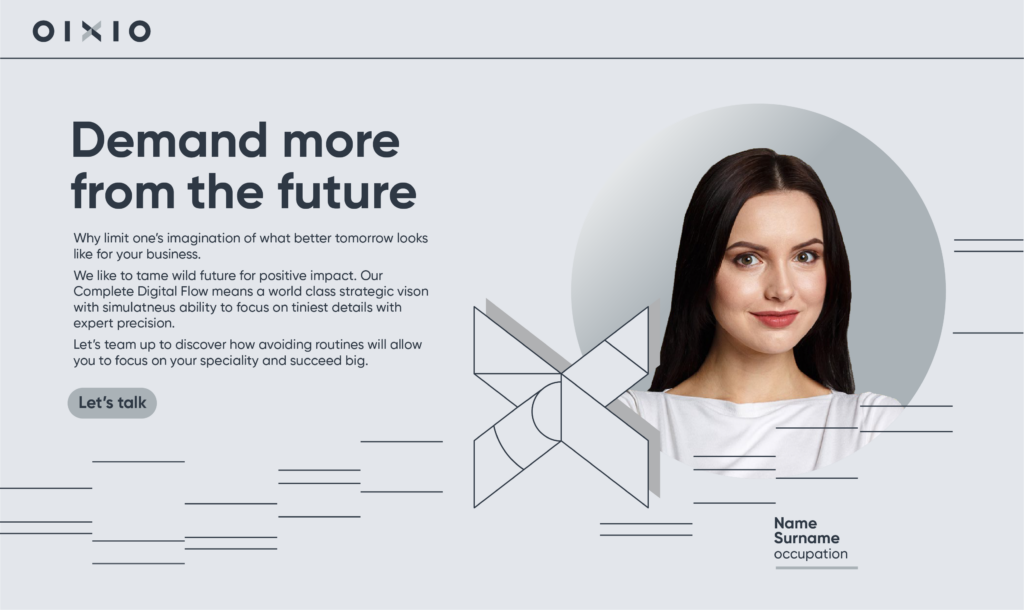
Our staff portraits capture the human drive to make the world better and more inspiring. They celebrate the talents within our teams and add a human touch, connecting real people to our evocative headlines. Staff portrates are important asset for OIXIOs branding and should appear in the most of the openings of imporatnt topics.
How to Create Staff Portraits
Set up a shooting environment where the background and model lighting proportions can be adjusted. Ensure the background remains sufficiently bright in the picture for easy and high-quality separation. When lighting a person, use natural and soft lighting that models the shape of the face smoothly and not too contrastingly. The light should not be directly on the face, the result should not be too flat and characterless. When taking pictures, make sure:
When taking pictures, make sure:
▪ The model is in their normal everyday appearance, avoiding festive hairstyles, too festive makeup, or dressing up.
▪ Avoid clothing with large graphics or logos.
▪ The team member feels at ease.
▪ Create a positive atmosphere by talking about success stories and/or find something humorous.
▪ Ask the person to stand stright or turn slightly their head and look into the camera or slightly past the lens. Try several poses, but don’t get too dramatic. The graphic format of the pictures in the layout already gives them a lot of visual character.
▪ Take multiple shots to avoid closed eyes and to find the most natural and positive expression.
▪ Select the best photo from the shoot and have it validated by the portrait subject.
Separate the background from the photo and frame the portrait on the background in sub-brand colors. Corresponding background files are included in the online brand guide. If possible and necessary, use the online application
headshotpro.com, which allows you to harmonize and correct the style of portraits with less effort and without the need for professional photographer and image editor.
An example of incorporating staff member image with illustrations within the context of the layout that establishes the OIXIO branding language, both visually and in terms of messaging.
Using Staff Portraits
The Staff Portraits play a vital role in OIXIO’s visual branding. They are carefully crafted with attention to image format, background color, added illustration, header and body text format, message content, and overall detail relationships.
Images have a background shade from the primary color palette and are framed in a circle. The background color corresponds to the specific business area or topic discussed.
Each topic view features one team member image. If more people need exposure, use the OIXIO Group tone as the background or adopt the Storytelling Images style, where the background is photographic, and the shape is a rounded rectangle.
An example of Staff portraits on sub-brand backgrounds